Review
Google Classroom is one of the products and tools offered by the G Suite educational pack. G Suite is the set of tools that Google offers of its applications that allow effective work between people. In general, they serve to connect, access files, create documents and control users, devices and data in an easy and risk-free way.
The G Suite product is paid for companies and businesses, however Google also offers a free version for Educational Centers. In addition to having no charges, it has no ads and storage in Google Drive, Gmail and Google Photos is unlimited.
On its official site, G Suite for Education states that its objective is to spread learning for all and transform the way in which students and teachers work and learn together with the tools proposed by the world's most important search engine package for school purposes.
One of the tools that are part of G Suite for Education is Google Classroom.
To use Google Classroom, both the student and the teacher must have a Google account for Education. The main function of the product is the creation of content that can be shared among students, teachers and parents of students. The tool allows for the seamless exchange of teaching materials in the virtual educational environment.
The user can create or join a class. In the event that you want to create a new class, you have the possibility to assign a name, which section it belongs to, what subject and name or number of the classroom. Once the new virtual classroom space has been created, you can assign images or topics related to the subject taught. The platform offers preset content.
Once the new class has been created, students can be invited through the People tab, copying the educational Google addresses that they have or, the tool also offers, obtain a code to share that is generated in the configuration option.
The possibilities that the G Suite for Education product offers when sharing information are several. You can attach material that you have on your computer or on Google Drive or you can direct people to links on YouTube or other sites on the web. After selecting the content to be shared, Google Classroom offers to schedule when it will be published for the rest of the class members with the option to choose the day and time.
If the teacher wants, they can load assignments from the Class Work alternative. In this modality, you have the option of asking questions (they can be developed or with multiple choice), giving instructions, evaluating with a score and giving back to the students about their performance in that task.
One of the most interesting modalities that Google Classroom presents is that of reprogramming tasks that were used in other classrooms. The option helps teachers save time so that they do not have to organize a new activity in case they have more than one course and want to reuse previously dictated material or assessments.
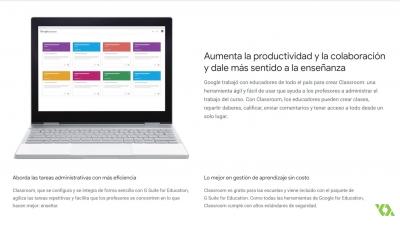
On the main screen of the tool offered in G Suite for Education, the user will find all the classes in which he participates and will be able to control what are the pending tasks in each virtual environment. This is a very useful tool for those who are in charge of many groups or for students who have more than one active class.
By clicking on each class, in the case of teachers, all the people who are part of the subject will be displayed and you can enter one by one to see their performance and even exchange opinions on tasks with the student.
Another very important feature of Google Classroom is that it has a mobile version available for both Android and iOS. The mobile platform collaborates for fluency in the communication of virtual educational environments since it allows notifications to be sent to those who have it and, in some cases, to answer questions or interact with the material from the application.
In an era where education changes day by day with the advancement of technology, Google brings with Google Classroom a tool that enhances the possibilities of teaching and communication between students, teachers and parents in the educational field.