Screenshot
Our Rate
6.1
Resolution (5/10)
Functionality (6/10)
Interface (8/10)
Upgrades (5/10)
Synchronization (5/10)
Review

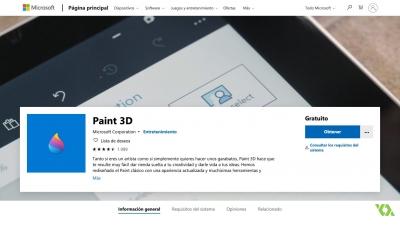
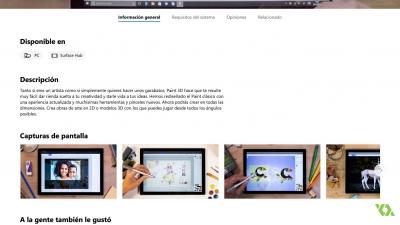
Paint 3D is a new and improved version of Microsoft's iconic graphics program. It has been redesigned, so it works and looks different. The app now offers tons of new brushes and tools. You can now create in any dimension, create 2D masterpieces or 3D models that you can view at any angle. The app was primarily intended for computer owners running Windows 10 operating system, but it also works on earlier versions.

What does the application offer?

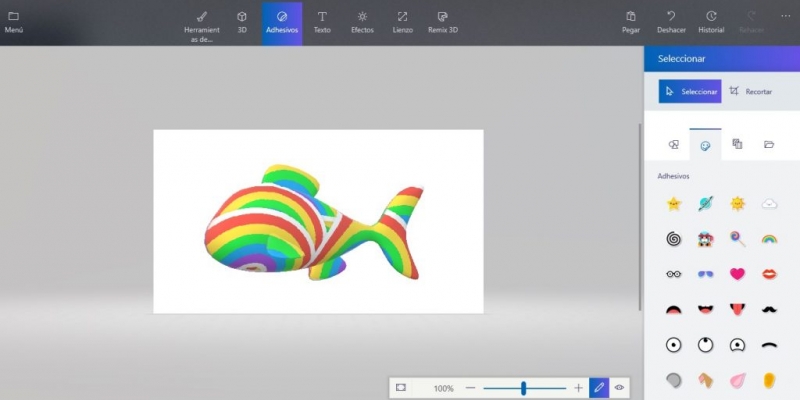
As the name implies, the application allows you to prepare three-dimensional objects. They can be models of characters, solids or various elements of the landscape. Paint 3D also offers the option to create sketches using the 3D effect. In addition to numerous tools for working in three-dimensional mode, the tool has also received many new types of brushes. During the work we can enrich your project by placing 3D models on it, as well as add images in the form of spectacular stickers. There is also the possibility to impose numerous graphic effects, crop images or add text options.

Paint 3D in society

Paint 3D also emphasizes the social aspect. We will easily put your work on the web through the Remix3D.com website, where we also find 3D models or graphics from other users around the world. The application also includes the function of recording the creation process, which we can share on the Internet to show how our work was created.

Do you want to download this review in pdf for free?

Paint 3D

Get last review 06.02.2026
Pros/Cons
Pros
- Fun and incredibly customizable creations.

- Possibility of sharing photos in 3D.

- It has many templates that you can use.

- His techniques are very fast and easy.
CONS
- Strictly not for professionals.

- 2D images cannot be converted to 3D images.

- There are payment templates.

- Limitation of tools.

Latest NEWS

Paint 3D lets you add effects

Paint 3D lets you add effects

News

The modern version of the traditional Windows program enables three-dimensional creation. Paint 3D not only brings news in terms of illustrations but also has a function that allows the user to add effects. Through this alternative, the Microsoft application lets you change the background with different colors, for example


Paint 3D is saved in the latest Microsoft update

Paint 3D is saved in the latest Microsoft update

Headline

The same has not happened to his little sister. Microsoft has released an update to Windows 10 that solves a problem in DNS security, but has caused the disappearance of such legendary programs as Paint or Notepad. As already announced at the time, Paint 3D can be found in the Micosoft Store


Paint 3D, videos and stickers among the new functions

Paint 3D, videos and stickers among the new functions

Headline

The classic Windows program is renewed. In a moment where the creativity of the users is squeezed to the maximum between social networks and video games of open worlds full of possibilities, Paint 3D is a simple proposal and full of tools to let your imagination run wild. Paint 3D has a function that enables the person to convert their project into MP4 videos. The program that has a variety of objects to configure in different dimensions and characteristics enables the possibility that at the end of the work, the user can save their production in video format. The steps to achieve this are as simple as putting Save As and choosing the Video option. On the other hand, in Paint 3D you can access a large number of stickers that the program brings. To get them you have to click on Stickers in the menu on the top bar


Paint 3D and a variety of possibilities to configure

Paint 3D and a variety of possibilities to configure

Headline

Paint 3D is one of the new proposals for Windows. With the tool that renews the traditional program for drawing the systems of the company founded by Bill Gates, a large number of options arrive to customize all kinds of configurations of the tools that come installed in Windows 10. The desktop is one of the cornerstones of Paint 3D. Being able to condition this part of the program in the best way will allow the user to create the best possible drawings. If what the person is looking for is to have fewer icons in that area, just click on the button in the right bar and activate the Compact Vision. On the other hand, Paint 3D supports both 3D and 2D printing. If the user wants to make a three-dimensional print, she must select the 3D Printing alternative. There you can, for example, choose in what material the action will be done


The new design of Paint 3D arrives

The new design of Paint 3D arrives

Headline

Little by little Microsoft has renewed the icons of its applications and tools. Now it has been the turn of Paint 3D, becoming the last to get its representation in Fluent Design. This change in appearance is now available to all users who have a version compatible with Windows 10, following the line of colors and shapes


How to improve the performance of Paint 3D

How to improve the performance of Paint 3D

Headline

Microsoft does not want to be left behind in the design sector. It is a serial program of those of Redmond, a natural substitute for the legendary Paint, but with the use of three-dimensional work. This results in the performance of some computers not being adequate. To get our equipment to work properly, we will have to adjust its configuration to make it work smoothly


Free
Send us your APP!
Send us your APP for free to our store. Free statistics, review, downloads ...

Contact us

Information Our mission is to give people the ability to show only the best search results and reviews. That's why we offer you a wide variety of best-tasting results, reviews, video games and applications, game news, shopping and much more. Please note that we are not affiliated with any game or application software developer unless otherwise specified. All the games and software applications that you can find in our catalog or in the search results are authentic and have not been modified in any way.
Caxooi.com
Login / Terms / Cookies / Contact / About us

About us | Terms | Contact | caxooi.com Gowa internet mobile SL VAT ID: B87495891. All Rights Reserved. | See information
Can not open /usr/share/GeoIP/GeoIP.dat